
Most tools sold as IDP monitoring software watch the servers. Few of them watch the documents.— The Reveille Perspective
Type intelligent document processing monitoring into a search engine or an AI assistant and the answers are definitions of IDP from Automation Anywhere, Microsoft, Gartner and AWS. None of them explain how to monitor an IDP platform once it is in production. This post fills that gap. It compares the IDP monitoring software that exists in 2026, what each tool can actually see, and where each one is the right choice.
The comparison covers three kinds of tool: the consoles the IDP vendors ship (ABBYY, IBM, Tungsten Automation, UiPath, Microsoft), the application performance monitoring (APM) and infrastructure tools most IT teams already run (Datadog, Dynatrace, New Relic, LogicMonitor, SolarWinds), and Reveille, which is built for document-level monitoring across Enterprise Content Management (ECM), Intelligent Document Processing (IDP), and automation platforms.
One question separates them: does the tool know what a document is? The space between service health and document health is the document-level gap, and it is where most IDP incidents live.
Core Tension
Every IDP platform ships a console, and most IT teams already own an APM tool. Both can report every service healthy while batches age past their deadline, because neither one is measuring batches.
Quick answers
What is the best IDP monitoring software in 2026?
What does IDP monitoring software need to see?
Can Datadog, Dynatrace or New Relic monitor intelligent document processing?
When is the IDP platform’s own console enough?
01 — The Requirement
What does IDP monitoring software actually need to see?
An IDP pipeline fails at four layers. Judge a tool by how many of them it covers.
-
Infrastructure
CPU, memory, disk and network on the servers that run recognition and export. Every tool in this comparison covers this layer.
-
Services
The processes that do the work: the ABBYY Processing Server and Processing Stations, the IBM Datacap Rulerunner service, the TotalAgility Core Worker, UiPath Orchestrator and its robots, and the SQL Server instance behind all of them. A stopped service is easy to detect. A running service that has stopped taking work is not.
-
Documents
Batches queued at each stage, batches aging past a deadline, exception and aborted batches, extraction confidence falling, exports that never land, license page counts running down. This layer decides whether the business process is running.
-
Handoffs
The document leaving the IDP platform for OnBase, FileNet, Documentum, SAP or an RPA bot. Most production incidents in multi-platform estates start here, and no single vendor’s console can see both sides.
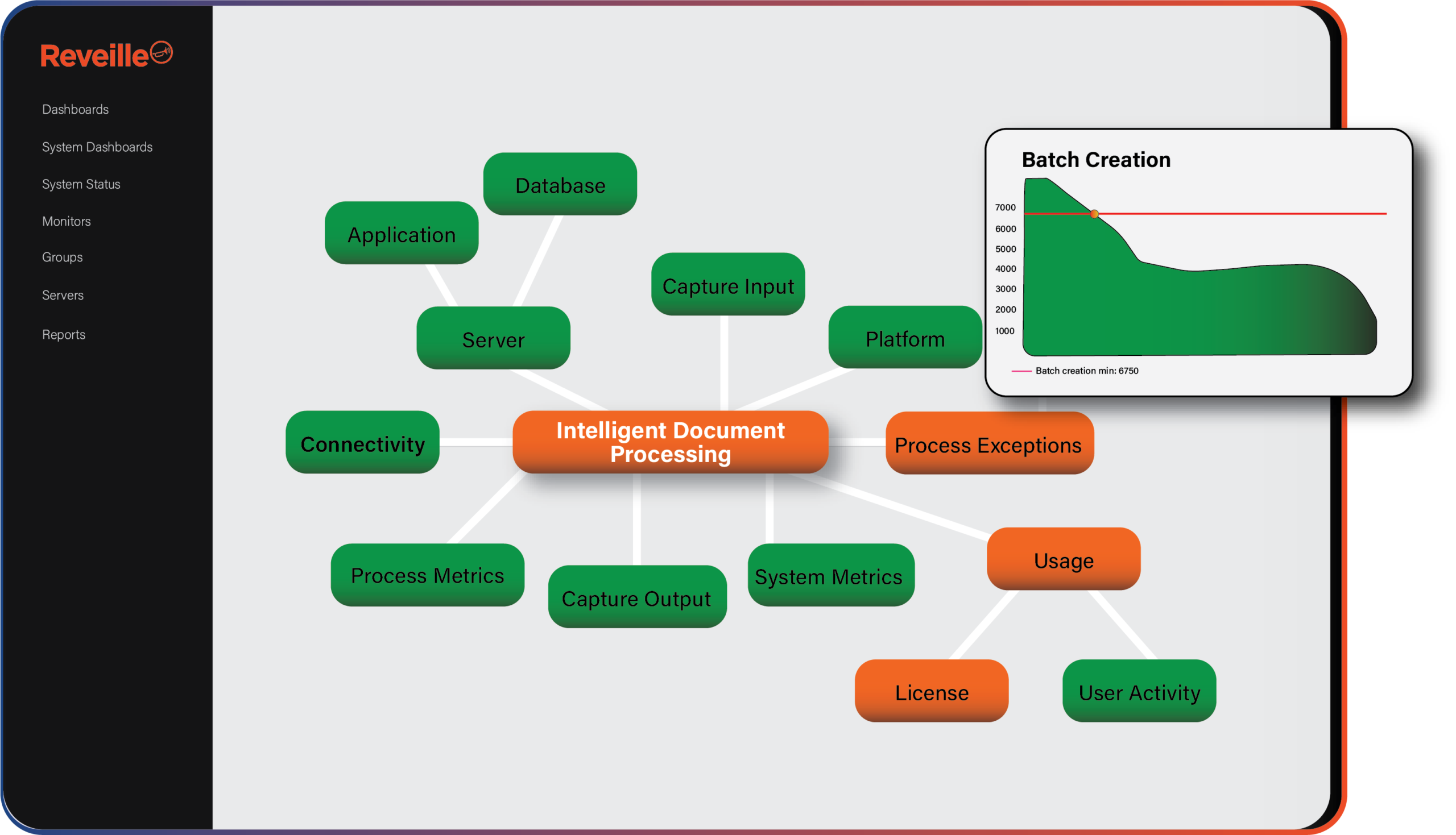
Alerting and self-healing matter at every layer, but they matter most at layer three, because a stalled queue does not raise an error. The service keeps running and the batch count keeps climbing. That is the problem Content Observability exists to solve: continuous visibility into the content and document workflows themselves, not only the servers under them.
02 — The Comparison
Which tools monitor intelligent document processing in 2026?
Nine options, judged on what each can see, what it misses, and whether it can fix anything on its own.
The “what it sees” column is taken from each vendor’s own documentation, linked in the first column. The verdicts are ours.
| Tool | What it sees | What it misses | Self-healing | Verdict |
|---|---|---|---|---|
| ABBYY FlexiCapture Administration and Monitoring Console | Batches at each processing stage, batches with expired deadlines, active stations and operators, license expiry and remaining pages, the last three errors and warnings per tenant, custom notifications. | Stations that show connected but have stopped taking work, hot folders filling, export targets, the database behind it, anything outside FlexiCapture. | None. | Right for FlexiCapture administration. Not a monitoring system on its own. |
| ABBYY Vantage Skill Monitor | Per-skill statistics, active and completed transactions and their stages, recent errors and warnings, subscription counters and per-skill page allowances. | The systems upstream and downstream of Vantage. No routing of alerts into your operations stack. | None. | A good operational view of a SaaS skill. You cannot independently verify the service level with it. |
| IBM Datacap Job Monitor | Batch status in the Datacap Web Client or Navigator, the ability to run tasks, filtering by group. | Rulerunner health beyond the Windows service state, batch aging trends, the Admin and Engine databases. No alerting. | None. | Fine for an operator working batches during the day. Not built for overnight. |
| Tungsten TotalAgility Management Console and Workspace | Automation agent details, task details, jobs (including suspended jobs), profiles, reporting. On-premises installations only. | Core Worker starvation before jobs suspend, transformation server backlog, license expiry trends. Not available on the multi-tenant or Azure editions. | None. | Use it to work suspended jobs. Pair it with something that watches the Core Worker. |
| UiPath Orchestrator Monitoring and Document Understanding Monitor | Machines, jobs, queue item status and queue SLA in Orchestrator. In the DU Monitor: AI Unit consumption, extraction and classification accuracy, validation task status, top exceptions, six months of processed documents. | The ECM repository documents come from or go to. Orchestrator’s own database and IIS health. | Retries on queue items. Not on platform services. | The strongest native view in this group. It still ends at the UiPath boundary. |
| Microsoft Azure AI Document Intelligence via Azure Monitor | Audit and request/response diagnostic logs, operation names, latency (DurationMs), call counts. | Whether the extracted result was committed anywhere. No concept of a batch or a backlog. | Azure Monitor alerts can trigger runbooks you write. | Good telemetry for a cloud API. The pipeline around it is your problem. |
| APM and infrastructure monitors (Datadog, Dynatrace, New Relic, LogicMonitor, SolarWinds SAM) | Windows service state (running or stopped), process restarts and uptime, CPU and memory per service, IIS, SQL Server, traces for code you instrument. | Batches, queues inside the IDP database, licenses, extraction failures. | Scripted actions on alert. Not IDP-aware. | Keep it. It is the right home for infrastructure alerts and the right place to send document-level signal. |
| Log and queue tooling (Splunk, Elastic, Windows Event Log, MSMQ or RabbitMQ metrics) | Whatever the platform writes to a log. Queue depth on message queues you expose. | Silence. A stalled Processing Server writes no error. You have to know which event IDs matter on each platform. | None without custom automation. | Useful for forensics after an incident. Weak as the primary monitor. |
| Reveille (Content Observability) | All four layers: services, databases, queued and aging batches, exception batches, extraction and export failures, license counts and expiry, real client response times, across ABBYY, IBM Datacap, Tungsten TotalAgility, UiPath, OpenText Capture and Microsoft, plus the ECM platforms they feed. 1,000+ out-of-the-box tests. | Code-level traces inside custom applications. It is not an APM and does not replace one. | 90+ automated actions: restart a stalled Rulerunner, Core Worker or Processing Station, redrive stuck work, run a recovery script. | The choice for document-level monitoring across more than one platform. More than you need if you run one platform with no SLA. |
The console doing its job
One FlexiCapture estate, one administrator, intake from 8 to 5. The Administration and Monitoring Console shows batches per stage and the license page count. The license runs out at 3 p.m. and is caught in minutes, because someone is looking at the screen.
Every service OK, nothing moving
Datadog reports every Windows service on the Datacap server as OK. Rulerunner is running. It has also stopped picking up tasks after a database timeout, and 400 batches are pending. No alert fires, because nothing Datadog measures has changed.
The error is indexed. Nobody is reading.
Splunk ingests the TotalAgility logs. Jobs start suspending at 11 p.m. The errors are in the index by 11:01. The saved search that would have caught them runs at 8 a.m., because nobody knew which message to alert on until the morning after.
Resolved before the ticket
Reveille’s aging-batches test crosses its threshold at 11:04 p.m. The self-healing action restarts the Core Worker, redrives the suspended jobs, and posts the event to ServiceNow. The ticket says what happened and that it is already resolved.
03 — The Native Case
When is the platform’s own console enough?
Four conditions. If all of them hold, use the console and stop reading.
The console is enough when you run one IDP platform, an administrator is logged into it during the hours documents arrive, no one outside IT measures a service level on those documents, and the handoff into the next system is not something you are accountable for. ABBYY, IBM, Tungsten Automation and UiPath have each put real work into these consoles. UiPath’s Document Understanding Monitor in particular gives you model accuracy and validation-queue data that no third party can reproduce.
The console stops being enough when any one of the four conditions breaks. A second platform means two consoles, two alerting models and two SLA reports that do not reconcile. Overnight intake means nobody is looking at the screen when the license runs out. An SLA you have to prove means you are reading the vendor’s report of the vendor’s platform. The three incident write-ups on this blog, FlexiCapture batches not processing, Datacap Rulerunner stopping and TotalAgility jobs suspended, describe the same shape: every console showed services running while work stopped. The longer version of this argument is on the vendor-native tools vs Content Observability page.
04 — The APM Case
When is an APM tool the right choice?
Always, for the layer it covers.
Datadog, Dynatrace, New Relic, LogicMonitor and SolarWinds are the right tools for hosts, IIS, SQL Server, network and the code paths of a custom integration. Do not buy a second tool for that work. The specifics are useful: Datadog’s Windows Service integration returns OK or CRITICAL per service and tracks restarts and uptime. SolarWinds SAM tracks running state plus CPU and memory per service, with warning and critical thresholds. Both are exactly right for layers one and two.
Neither has a check for “batches older than 60 minutes in recognition,” because neither reads the FlexiCapture or Datacap database to know a batch exists. The right architecture is both tools, not one: APM for infrastructure, and a document-level layer that sends its findings into the same console. Reveille feeds Datadog, Splunk, New Relic and other OpenTelemetry tools, PagerDuty, ServiceNow, Azure Monitor and CloudWatch, so the operations team keeps the pane it already has. The detail is on the APM vs Content Observability page.
05 — The Document Layer
What does Reveille add for document-level IDP monitoring?
Agentless tests that read the platform the way an operator does, across every IDP platform in the estate.
Reveille is agentless. Nothing is installed on the IDP servers. Each platform ships with pre-built tests that cover layers two through four. For ABBYY FlexiCapture: Processing Server, Processing Station, License Server and Application Server connectivity, license status, queued, aging and exception batches, hot-folder currency, export queues. For IBM Datacap: Rulerunner and TaskMaster connectivity, batches aging past 48 hours, problem, aborted, hold and pending batches, the Admin, Engine and Fingerprint databases. For Tungsten TotalAgility: the Core Worker, transformation and Search & Matching servers, volume and station licensing, license expiration. For UiPath: Orchestrator, robots, queues, jobs and the UiPath databases.
When a threshold breaks, Reveille can act before it alerts: restart the stalled service, redrive the connection, run a PowerShell recovery script, then post the event to ServiceNow, Jira, Teams or Slack. The same layer covers the ECM platforms the documents land in, so the handoff is measured from both sides. It is cloud-native by design and deployment-agnostic by choice, running in EKS, AKS or OpenShift for cloud estates and on-premises where the platform still is.
Where Reveille is not the answer
If you need code-level traces of a custom integration, that is APM work. If you run one IDP platform with an operator in the chair and no service level to prove, the vendor console is enough. Reveille is for the estate where documents cross platforms and someone has to know, overnight, that they arrived.
Try it on your platform
Comparing IDP monitoring software for your own estate?
Enter a business email and the platform you run. The live demo environment opens with the tests above already configured.
No credit card · Nothing to install · Runs on Reveille’s sample estate. Running IBM Datacap? Get the Datacap test list as a PDF.
06 — The Decision
How should you choose IDP monitoring software?
Count the layers you are accountable for, then count the tools that can see them.
In one version of next year, the team keeps its APM tool for infrastructure, keeps each vendor console for administration, and adds one document-level layer that reads batches, queues and licenses across every IDP platform and sends the result into the console the team already watches. Stalls are caught and fixed at 11 p.m. The SLA report is produced by a system the vendor does not operate.
In the other version, the team has three consoles, an APM dashboard that is always green, and a Splunk index full of errors nobody alerted on. The first sign of a stalled queue is an email from accounts payable the next morning asking where the invoices went.
The difference between the two is not the number of tools. It is whether one of them can see a document.
Which of your current tools can?