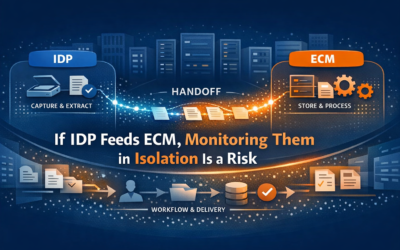

The job stopped being “keep the server up” a long time ago. Today’s ECM admin runs an estate — multiple platforms, multiple clouds, and workflows that cross all of them. The estate doesn’t care which console you’re staring at.
— The Reveille Perspective
How do Enterprise Content Management (ECM) admins manage their applications when no two of them come from the same vendor anymore? Not with the morning checklist — though that’s still how most days start. 7:40 a.m.: the Hyland OnBase console, the OpenText admin pages, an IBM FileNet dashboard, an ABBYY Vantage skill monitor, a TotalAgility queue view, the SharePoint admin center. Six tabs. Six alerting models. Six versions of green.
Every platform on that list is business-critical. Every one ships its own console, its own thresholds, its own definition of healthy. And not one of them can see the workflow that crosses all of them — the invoice captured in Vantage, committed to OnBase, archived through OpenText, surfaced to a Copilot prompt in Microsoft 365. The estate got bigger. The workflows got longer. The tooling stayed platform-shaped.
There’s a name for running that estate by ritual: checklist operations — managing business-critical applications through manual sweeps of vendor consoles that were never designed to talk to each other. The admins who escape it don’t work the checklist harder. They replace it with five habits: know your estate, watch the workflows, automate the checks, prove your SLAs, and get the content layer ready for AI.
Core Tension
Every platform in the estate ships its own console, its own alerting model, and its own SLA report — and none of them can see the workflow that crosses vendor boundaries. The admin is accountable for the end-to-end process. The tooling stops at each vendor’s wall.
Quick answers
How do ECM admins manage applications across multiple platforms?
Why isn’t platform uptime enough to manage an ECM application?
How can ECM admins automate their daily health checks?
How should ECM admins prepare their platforms for AI workloads?
01 — The Estate
What Applications Does an ECM Admin Actually Manage?
You can’t run what you haven’t mapped — and the map keeps changing underneath you.
More than the org chart admits. A typical estate now spans two or three ECM platforms, at least one Intelligent Document Processing (IDP) engine, an automation tier, and Microsoft 365 — each on its own release cadence, and most of them mid-transition.
Knowing the estate means knowing where each vendor is taking it. Hyland OnBase remains the long-haul workhorse across on-premises and cloud deployments. OpenText Content Management is the platform formerly known as Extended ECM — same Content Server underneath, new name on the box. IBM made Content Cortex generally available in June 2026, redrawing the road map for every FileNet P8 estate. ABBYY’s road map now runs through Vantage while FlexiCapture editions work through end of life — which means many teams are operating two capture stacks at once. Tungsten Automation continues to consolidate its portfolio around TotalAgility. And Microsoft 365 keeps absorbing content workloads while on-premises SharePoint 2016 and 2019 quietly passed out of support.
The inventory isn’t a spreadsheet exercise. It’s the map that decides what you watch.
| Platform | State of play | What the admin watches |
|---|---|---|
| Hyland OnBase | Long-haul workhorse, on-prem and cloud | Client logins, workflow timers, disk groups, batch commits |
| OpenText Content Management | Renamed from Extended ECM | Content Server threads, search, Archive Center, OTDS |
| IBM FileNet P8 / CP4BA | Content Cortex GA reset the road map | CPE health, queues, index jobs, Content Navigator |
| ABBYY Vantage + FlexiCapture | Migration era: two capture stacks at once | Skills, transactions, batch aging, license page counts |
| Tungsten Automation TotalAgility | Portfolio consolidating around TotalAgility | Job processing, import connectors, batch aging, licensing |
| Microsoft 365 / SharePoint | 2016/2019 past end of support; Embedded growing | Site performance, timer jobs, OneDrive, M365 Backup |
02 — The Signal
Why Watch the Workflows, Not Just the Servers?
Every availability number your vendors publish measures whether the platform responded — not whether documents moved.
Because platform SLA is not workflow SLA. OnBase can answer every connectivity ping while a Workflow Timer never runs and uncommitted batches pile up in a disk group. TotalAgility’s services can all report running while batch aging creeps past the point where your service level quietly died. Vantage can accept every upload while a single extraction skill fails on one document class. FileNet’s Content Platform Engine can look perfectly healthy while a queue’s element count climbs all afternoon. Nothing is down. Everything is stuck.
This is the gap Content Observability exists to close: the continuous visibility, assurance, and optimization of the content and document workflows that drive business outcomes — and feed AI. Infrastructure monitoring tells you the code ran. The content-layer signal tells you the invoice made it through.
03 — The Automation
How Do You Automate the Morning Checklist?
Every check you run by hand is a check that only runs when you remember to run it.
Replace each manual check with an automated one that understands the application. Application-aware tests — connectivity, services, database health, queue depths, client logins, license utilization — run continuously instead of once per morning. Reveille ships more than 1,000 purpose-built tests across ECM, IDP, and automation platforms, so the checklist becomes configuration, not ritual.
Automation also changes what happens when a check fails. Self-healing actions restart the stalled service, redrive the connection, or clear the known failure mode before it reaches the ticket queue — and the exceptions that do escalate route into ServiceNow, Splunk, PagerDuty, or Teams. No new console. The signal goes where your team already works.
04 — The Record
How Do You Prove Your SLAs Instead of Asserting Them?
A screenshot of six green dashboards is an assertion. An availability record is an answer.
With a service-level record you didn’t author yourself. When the CIO asks how the estate performed this quarter — or an auditor asks who accessed which documents, and when — the answer has to come from measurement, not memory.
The discipline is one standard across every platform: availability and service-level reporting calculated the same way for OnBase as for TotalAgility, delivered on schedule instead of assembled the night before the review. And because Reveille isn’t built, sold, or operated by the platforms it measures, the record is independent — verification of your vendors’ SLAs that your vendors don’t write.
Reveille for IT Ops & Platform Owners
End-to-end service level assurance across every cloud and every vendor — with the data to prove it to auditors, regulators, and customers. See how platform owners run their estates on Reveille →
05 — The AI Horizon
How Do You Get the Estate Ready for AI Workloads?
Assume every platform you run is about to host an AI workload — because it is.
Copilot is already reading SharePoint and OneDrive. Content Cortex puts agentic AI on top of FileNet content. Hyland, OpenText, and ABBYY are shipping assistants and agents into the same repositories your workflows feed. The estate you administer is becoming the supply chain for every AI initiative in the company.
That raises the stakes on every discipline above. Agents consume content at machine scale, around the clock, often without a human checkpoint — so a silently failed extraction or a stalled workflow doesn’t produce an error. It produces confident, wrong output, at volume. The model is fine; the pipeline feeding it is broken. Preparing the estate means instrumenting the content layer before the agents depend on it: observability for AI, not observability replaced by AI. The Reveille platform also supports the Model Context Protocol (MCP), so AI assistants and agents can query the same observability layer your team does.
Forward Principle
AI is a force multiplier on whatever the content layer is doing. If the content layer fails silently, AI fails silently — at scale.
06 — The Point
Which Kind of Admin Runs Your Estate?
Two versions of this job exist twelve months from now. Only one of them still starts at 7:40 a.m.
In one version, the checklist is gone. The estate map is current. Workflow-level tests run around the clock, most failures resolve themselves before anyone files a ticket, the quarterly SLA report generates itself from an independent record — and when the AI program lands on your platforms, the first question it asks (can we trust the content layer?) already has an answer.
In the other version, tomorrow looks like this morning: six consoles, a ritual sweep, service levels asserted from memory — and an agent rollout discovering the estate’s blind spots at machine speed, in front of the business.
The platforms are identical in both futures. The difference is whether the estate was run on evidence or on ritual.
The morning checklist will always feel productive. The real question is what it costs you to keep it — and who finds out first when green isn’t the same as flowing?
Ready to retire the morning checklist?