Verify the Reveille 8 User Analytics Database
To verify the Reveille Database configuration, follow these steps:
- Run the Reveille 8 User Analytics verify database utility. The verify utility, ReveilleVerifyDatabase.exe, is located in the X:\<reveille installation path>\ReveilleSoftware\ \ReveilleUserAnalytics\ReveilleUserAnalytics\Support\VerifyDatabase folder or is also available from the Reveille Software electronic download software location – contact Reveille Support at reveille.support@reveillesoftware.com for access information. Copy the complete verify database folder to the Reveille 8 User Analytics server.
- Launch the Reveille 8 User Analytics verify database utility. The Reveille 8 User Analytics Verify Database Utility main window appears.

- Click Verify Database. The verify database process will start and display status messages.
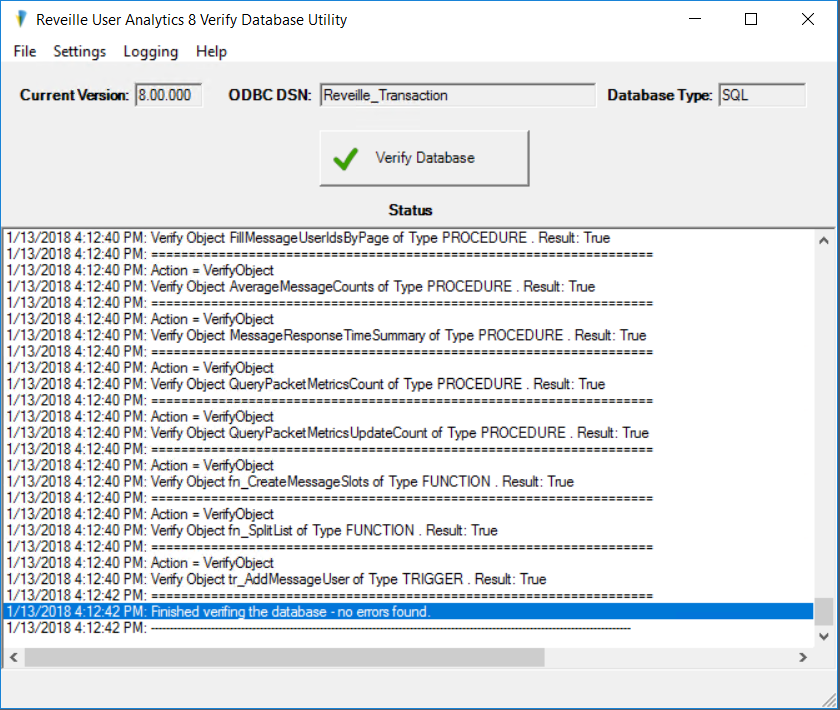
The verify database process will vary in time required to complete depending on the Reveille database size. Once complete, a message ‘Finished verifying the database – no errors found’ will be displayed at the bottom of the Verify Database Utility window. Correct any database verification errors before going to the next step; if necessary contact your DBA for assistance.
Was this helpful?
Please tell us why:
Thank you.